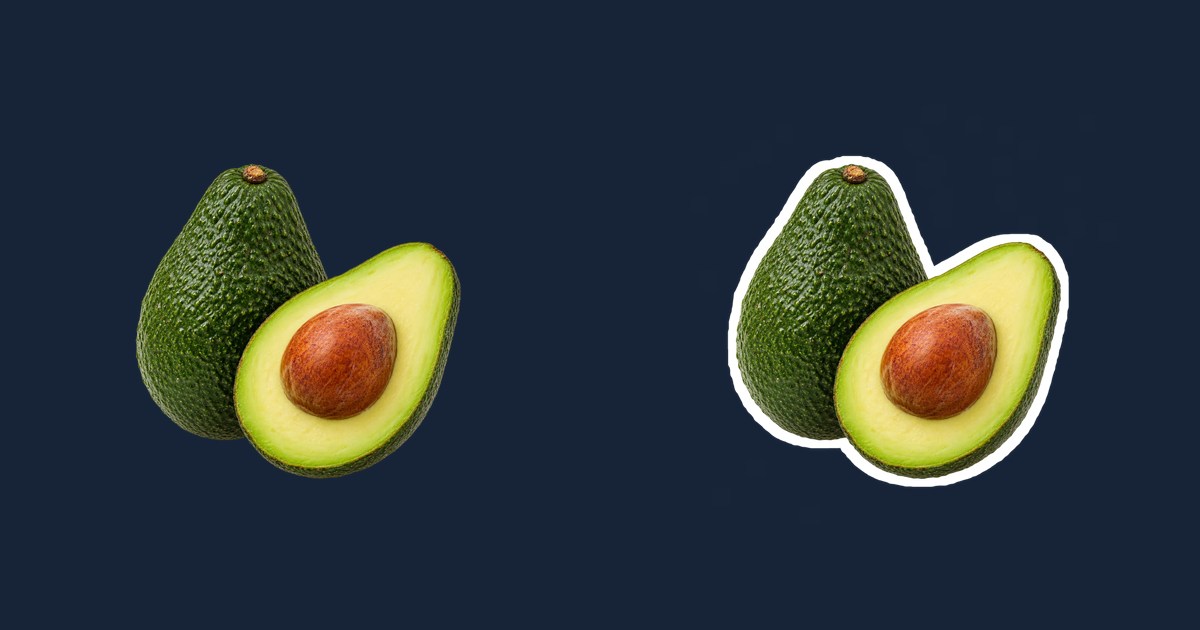
To add a white outline to a transparent PNG in Python, expand the cutout’s alpha channel, use it to mask a white layer, and place the original cutout on top. This gives a food sticker a visible edge on a dark menu or flyer while leaving the surrounding canvas transparent.
In the comparison above, the same avocado appears before outlining on the left and with an 8-pixel stroke on the right. Both use the same dark background for the preview.
Start with an image that already has a transparent background
Download the Avocado Cutout and save it as cutout.webp. It is an AI-generated image available under the Stock Tour Asset License. A transparent PNG also works. Change the input filename in the first line that opens the file. If your cutout has a wide empty margin, trim the transparent padding before sizing it.
Grow the alpha mask and export the PNG
Install Pillow with python3 -m pip install Pillow in your Python environment. Save the code as add-outline.py next to the source and run python3 add-outline.py. Set the thumbnail dimensions for your layout first so the outline width is measured in output pixels.
from PIL import Image, ImageFilter

with Image.open("cutout.webp") as file:
    cutout = file.convert("RGBA")

cutout.thumbnail((420, 420), Image.Resampling.LANCZOS)
low, high = cutout.getchannel("A").getextrema()
if low != 0 or high == 0:
    raise ValueError("Use a cutout with visible and fully transparent pixels.")

width = 8
margin = width + 1
size = (cutout.width + 2 * margin, cutout.height + 2 * margin)
subject = Image.new("RGBA", size)
subject.paste(cutout, (margin, margin))

alpha = subject.getchannel("A")
expanded = alpha.filter(ImageFilter.MaxFilter(2 * width + 1))
white = Image.new("RGBA", size, "white")
white.putalpha(expanded)
Image.alpha_composite(white, subject).save("cutout-outline.png")
Pillow’s MaxFilter takes the maximum alpha value inside a square window. A 17-pixel window expands the mask by up to 8 pixels horizontally and vertically. The extra pixel of canvas on each edge leaves room beyond the stroke even when the subject touches the edge of the input. Alpha compositing then places the original cutout over the white layer.
Check the outline on the background you will use
With Pillow 12.3.0, the 1254 × 1254 avocado became a 420 × 420 working image. Adding 9 pixels of padding on each side produced a 438 × 438 PNG. All four corners had alpha 0, and the stroke added visible pixels outside the original cutout. Place the result on your actual menu background at its final size to check the edge. The white rim shows clearly on navy, but a darker rim may suit a light background. Change the color passed to Image.new for the outline layer.