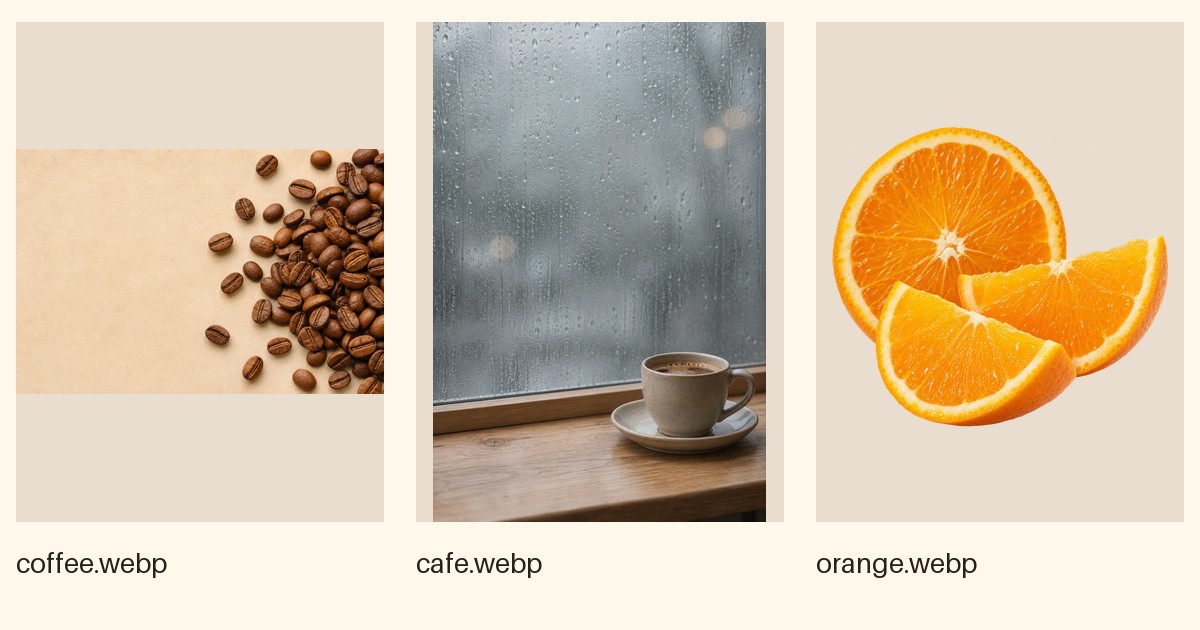
To make a contact sheet in Python without cropping the images, fit each preview inside a fixed box and center it on a background. Print the filename beneath each preview so a reviewer can tell you exactly which image to use. The finished JPEG above shows a landscape image, a portrait image, and a square cutout.
Put the files in review order
Place these three AI-generated WebP files in one folder and rename your copies as shown. The examples are available under the Stock Tour Asset License.
coffee.webp: Coffee Beans with Copy Space, 1536 × 1024.cafe.webp: Rainy Café Window Background, 1024 × 1536.orange.webp: Orange Slices Cutout, 1254 × 1254 with transparency.
Change the list order in the script to change the left-to-right order in the sheet. Use short names that fit on one line. If the original names are long, rename the working copies with clear subject names and keep the originals.
Fit the previews and add filenames
Install Pillow with python3 -m pip install Pillow in your Python environment. Save this code as make-sheet.py beside the images and run python3 make-sheet.py. The list sets the columns, and each image gets an area no larger than 368 × 500 pixels.
from PIL import Image, ImageDraw, ImageFont, ImageOps

files = ["coffee.webp", "cafe.webp", "orange.webp"]
cell_width = 400
sheet = Image.new("RGBA", (cell_width * len(files), 630), "#fff8eb")
draw = ImageDraw.Draw(sheet)
font = ImageFont.load_default(size=27)

for index, filename in enumerate(files):
    with Image.open(filename) as source:
        preview = ImageOps.exif_transpose(source).convert("RGBA")
    preview.thumbnail((368, 500), Image.Resampling.LANCZOS)

    left = index * cell_width
    x = left + (cell_width - preview.width) // 2
    y = 22 + (500 - preview.height) // 2
    draw.rectangle((left + 16, 22, left + 383, 521), fill="#e9ddd0")
    sheet.alpha_composite(preview, (x, y))
    draw.text((left + 16, 546), filename, fill="#282119", font=font)
    print(filename, preview.size)

sheet.convert("RGB").save("contact-sheet.jpg", quality=90)
Pillow’s thumbnail method scales down the full image while preserving its proportions, apart from pixel rounding. The script composites the orange’s transparent areas onto the same beige used around the other previews. This makes a readable JPEG for review while keeping the original WebP available as a cutout.
Check the JPEG and send the sheet for review
The example produces a 1200 × 630 JPEG. The terminal reported 368 × 245 for coffee, 333 × 500 for the café window, and 368 × 368 for the orange. The spare space above and below the landscape image is expected. Check that every filename is visible, then ask reviewers to refer to the filenames shown on the sheet. Use the original file for the design you select.