A café flyer needs three things a reader can spot quickly: the offer, when it is available, and where to get it. Canva and Adobe Express both offer free design plans with templates. Either is a starting point for a square café announcement using your own food photo.
Choose the editor based on the layout you can adapt and the format you need to publish. This comparison covers the standard free plans and uses one square social post as the example.
What to check · The comparison setup · Tool comparison
What to check before you pick a flyer maker
- Template. Choose a layout with a large headline and room for the date. Look for a free template with editable text and a replaceable photo.
- Export. For a social announcement, aim for a square PNG or JPG. If you also need a printed flyer, test PDF export at the final size. Set up the print size separately.
- Paid elements. Inspect the template for premium assets before editing. Check the downloaded file for a watermark and confirm the image dimensions before scheduling the post.
The comparison setup
The example uses a 1080 × 1080 px canvas, Stock Tour’s lemon and rosemary image, and the same event copy in both editors. Place the headline and details in the open area above the lemons. The dates and venue below are sample copy.
Lemon & Rosemary Weekend
Sat–Sun · 10 a.m.–2 p.m.
At [café name] · [street address]
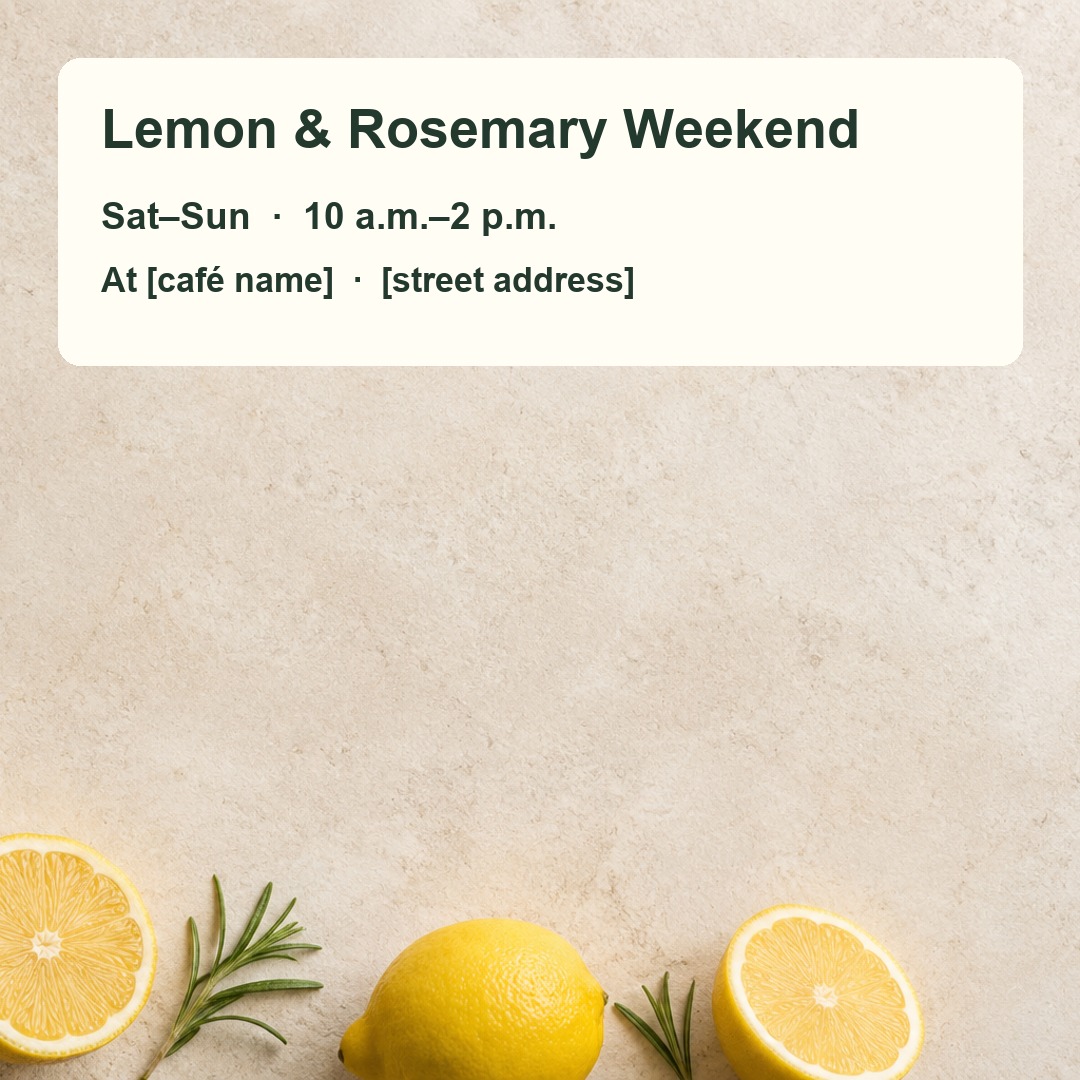
Begin with a blank square or a simple template, replace the photo with the lemon and rosemary background, and keep the same three lines of text. This isolates the main workflow from each service’s paid asset library. The comparison uses the providers’ free-plan documentation. The illustration is a layout reference prepared by Stock Tour. Check the final download in the editor you choose.
Canva Free
Start with an Instagram post if you want a square canvas and rich template browsing. Replace the image and text, then preview the composition at phone size. Canva publishes a free tier as well as paid tiers with additional assets and features. Before committing to a template, confirm that its fonts and graphics are available on your plan. The separate Stock Tour Canva walkthrough shows the import process for a different image.
Adobe Express Free
Start with a square social design if the intended destination is Instagram or a similar feed. Adobe’s flyer maker offers a template-led workflow, while its pricing page describes a free plan with basic design tools. Check the canvas dimensions when starting from a flyer template, since a print flyer preset is often portrait. Add the same photo and text, then inspect the available download choices before relying on a format.
Free-plan comparison
| Check | Canva Free | Adobe Express Free |
|---|---|---|
| Published free plan | Yes | Yes |
| Suggested starting canvas | Square social post | Square social post |
| What to test before scheduling | Confirm that all chosen template elements are free and inspect the export | Confirm template access, final dimensions, and the export |
Which editor fits the job?
Use the editor where you can finish the same layout with the fewest fixes. For a one-off announcement, start from a blank square so you can control the photo and fonts. For a weekly promotion, save an editable copy and swap only the date, headline, and photo. Export a test and open it on your phone before sharing.
Sources and related guides
Free-plan information reviewed November 21, 2026. Canva pricing · Adobe Express plans · Adobe flyer maker
How to use transparent food images in Canva · How to add readable text to food images