Before posting a food photo, you can make a separate JPEG copy with its EXIF GPS directory removed. The Pillow script below keeps the photo’s EXIF orientation and ICC color profile and checks that the new copy has no EXIF GPS directory. It re-encodes the image and is intended for JPEGs whose location is stored in EXIF.
Check where the location is stored
A camera can record coordinates in the GPS directory within EXIF. Some editors can also write location information to XMP or IPTC fields. This example stops if Pillow sees embedded XMP. If you also use location fields such as city or sublocation, check those with a metadata inspector before sharing. The EXIF test only checks the GPS directory.
Write a separate copy without EXIF GPS
Use Python with Pillow installed. Put this script next to food.jpg and run python3 remove_exif_gps.py. Change the two file names as needed. The script checks the new JPEG in memory and refuses to overwrite an existing food-share.jpg.
from io import BytesIO
from pathlib import Path
from PIL import ExifTags, Image

source = Path("food.jpg")
target = Path("food-share.jpg")
gps = ExifTags.IFD.GPSInfo

with Image.open(source) as photo:
    if photo.format != "JPEG" or photo.info.get("xmp"):
        raise ValueError("Use a JPEG without embedded XMP.")
    exif = photo.getexif()
    if gps in exif:
        del exif[gps]
    data = BytesIO()
    photo.save(
        data, "JPEG", quality="keep",
        exif=exif.tobytes(),
        icc_profile=photo.info.get("icc_profile"),
    )

data.seek(0)
with Image.open(data) as copy:
    if gps in copy.getexif():
        raise ValueError("The copy still has an EXIF GPS directory.")

with target.open("xb") as output:
    output.write(data.getbuffer())
Pillow’s quality="keep" reuses JPEG encoding settings such as the quantization tables. The image is still compressed again. If you need to keep the original compressed pixels, choose a tool that edits metadata without re-encoding. For the options used here, see Pillow’s JPEG save documentation.
Check the file you plan to publish
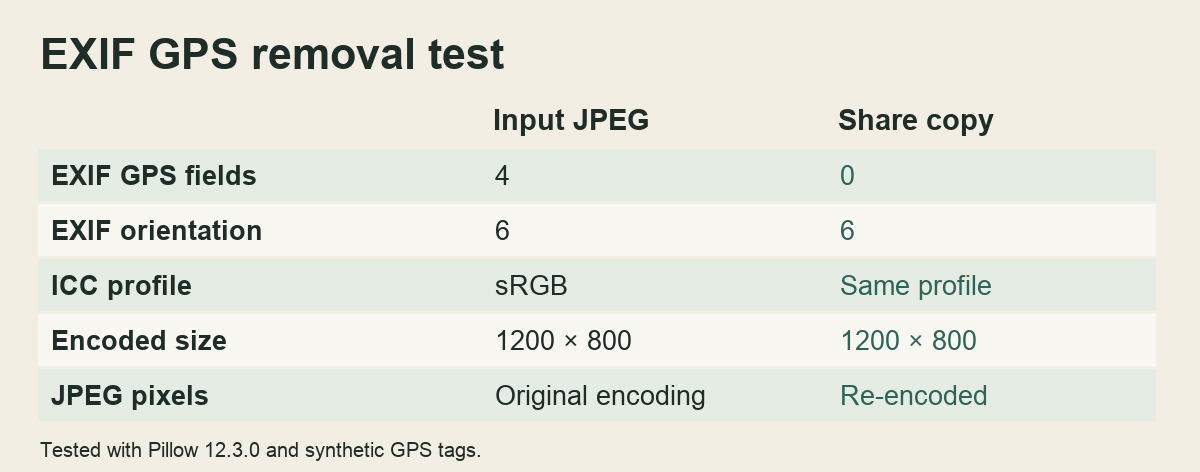
In a Pillow 12.3.0 test with synthetic coordinates, the EXIF GPS directory went from four fields to zero. The orientation tag stayed at 6, the sRGB profile was byte-for-byte identical, and the encoded dimensions stayed at 1200 × 800. The test detected changed pixel values after re-encoding. We used an AI-generated artisan bread image from Stock Tour.
Open the copy before uploading and confirm that the photo still appears upright and your attribution is present as needed. GPS tags say nothing about what is visible in the image itself. Inspect the frame for addresses, labels, or other details you intended to keep private. If the photo is already sideways in an app, apply the EXIF rotation before resizing it.