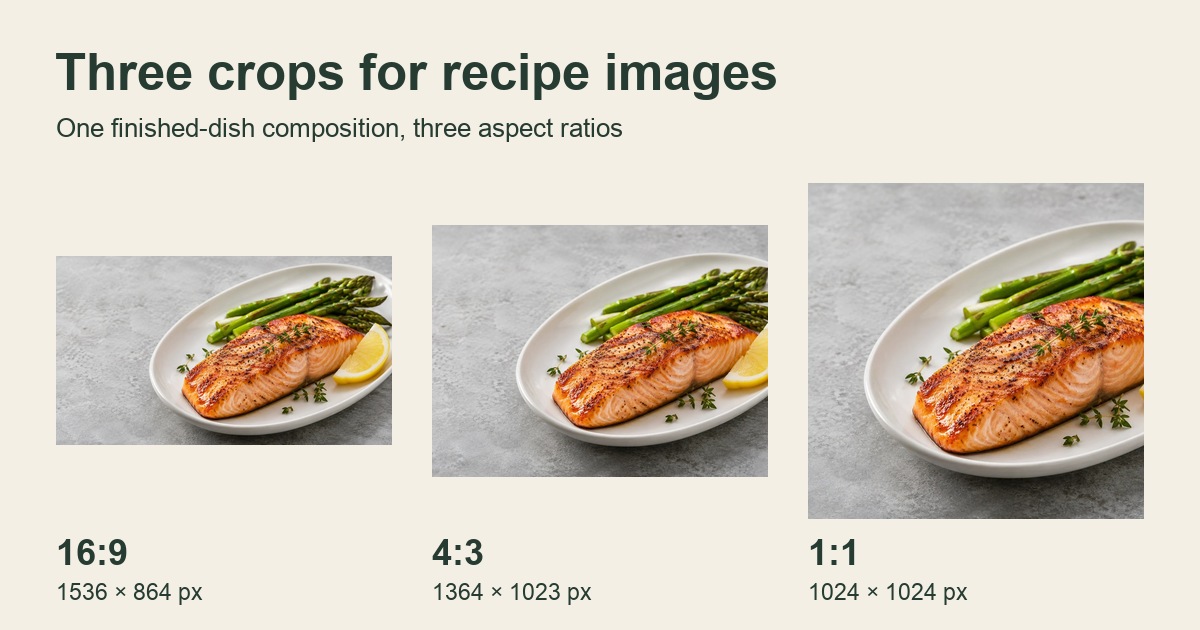
For Google’s Recipe structured data, prepare three crops of the finished dish: 16:9, 4:3, and 1:1. Start with the square crop. A dish that looks complete in a wide image can lose its garnish or even part of the main ingredient when you center a square over it.
Export three crops without stretching the dish
Google’s Recipe documentation recommends multiple high-resolution images with those ratios and at least 50,000 pixels per image when you multiply width by height. Set the aspect ratio first, then reposition the crop and export each version as a separate file. Start with a photo that represents the recipe’s finished dish.
For the crop demonstration above, we used a 1536 × 1024 AI-generated salmon illustration. We cropped the same source and reopened the exported JPEGs to check their dimensions.
- 16:9, 1536 × 864: Remove 80 pixels from the top and bottom and leave the sides in place.
- 4:3, 1364 × 1023: Reduce the width and keep most of the original height.
- 1:1, 1024 × 1024: The centered crop trims the right side of the fillet and loses almost all of the lemon wedge.
Move the square crop toward the food
In this source the plate sits on the right. Moving the 1024 × 1024 square 256 pixels to the right keeps the fillet and lemon within the frame without enlarging the image. Check smaller previews for ingredients that matter to the dish, especially at the edges. If a crop still removes a defining ingredient, use another photo of the completed recipe with more room around the plate.
Use the three final files on the recipe page
Upload the final crops, check that each image URL opens while logged out, and use those URLs in the Recipe image field. A CSS crop can help you preview the composition, but the URL in recipe markup should point to the actual exported image. Test the recipe page with Google’s Rich Results Test. Image sizes alone cannot guarantee a rich result. For a separate title image above your recipe, see how to lay out a recipe blog header.