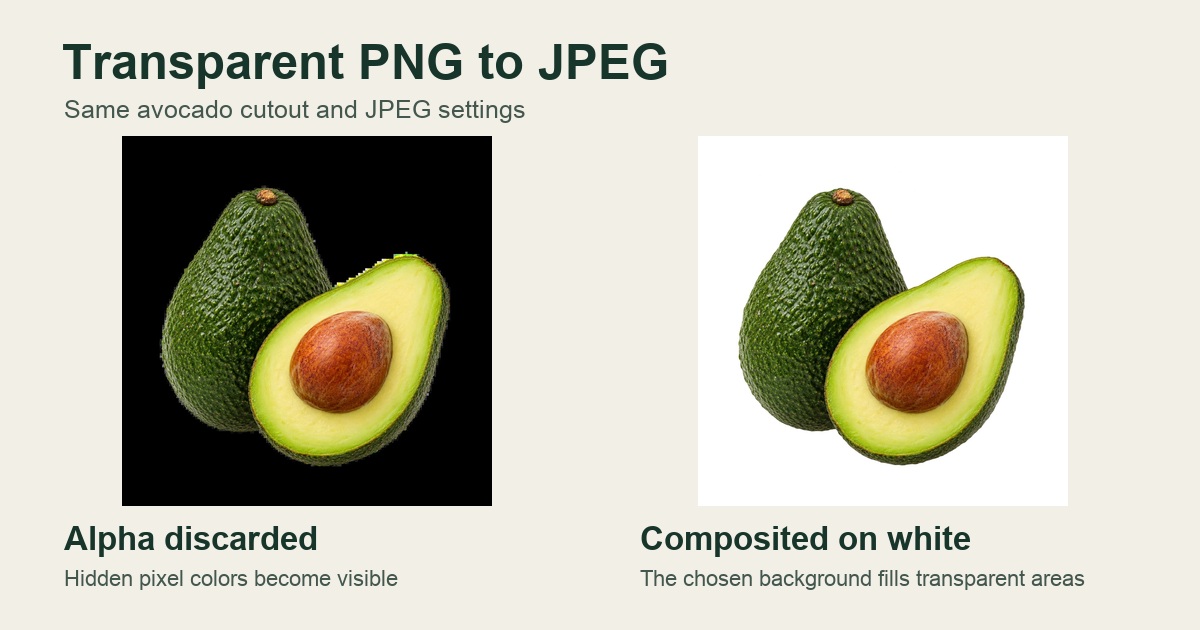
To turn a transparent PNG into a JPEG with a white background, composite the PNG onto solid white before saving it as RGB. A JPEG has no alpha channel. If you drop the alpha first, the colors stored under transparent pixels can show through. In the comparison above, direct RGB conversion revealed a black background. Compositing gave the same cutout a white background.
Flatten the PNG onto the background you want
This example uses Pillow and a 1,254 × 1,254 PNG made from Stock Tour’s AI-generated avocado cutout. Install Pillow in your Python environment with python -m pip install Pillow. Put your PNG beside the script as avocado.png, or change the filename to match your file.
from PIL import Image

with Image.open("avocado.png") as source:
    cutout = source.convert("RGBA")

background = Image.new("RGBA", cutout.size, "white")
result = Image.alpha_composite(background, cutout)
result.convert("RGB").save("avocado-white.jpg", quality=92)
Fully transparent pixels take the background color. Partly transparent pixels, such as those around a soft edge, blend with that color. Change "white" to a hex value such as "#f2efe6" if the JPEG needs to sit on a cream-colored menu. The image dimensions stay the same. See Pillow’s alpha compositing reference.
Open the JPEG and check a corner and an edge
Both test exports reopened as 1,254 × 1,254 RGB JPEGs at quality 92. The top-left pixel was black (0, 0, 0) after direct RGB conversion and white (255, 255, 255) after compositing. Check a fully transparent area from your original for the chosen background, then zoom in around the subject to look for a dark or light fringe. JPEG compression can shift pixel values near edges.
Keep the PNG as your editable source so you can make another JPG for a different background. If you started with a Stock Tour WebP and need that transparent working file, see how to convert a transparent WebP to PNG on a Mac.