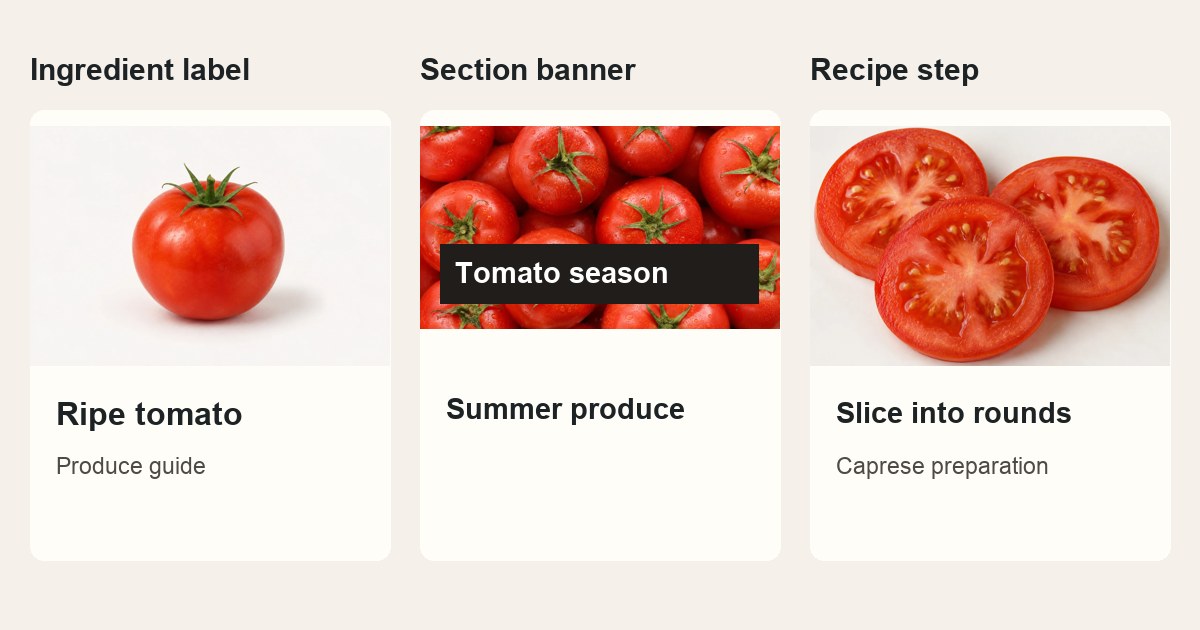
Use a single whole tomato when the reader needs to recognize the ingredient, a frame-filling group when a banner needs texture, and visible slices when the reader needs to recognize the cut. The three mockups above show where the words go in each layout. All three images are AI-generated illustrations available as 1536 × 1024 WebP files under the Stock Tour Asset License.
Ingredient card with a label below the image
In the left mockup, the single whole red tomato fills the center of a 360 × 240 image slot. The pale area around it makes the fruit’s edge easy to see, and the green stem stays in the frame. Put “Ripe tomato” below the image so the label can wrap on a narrow card without covering the fruit. On a produce guide, use the same label position for neighboring ingredients.
Wide produce banner with a solid label
In the middle mockup, the frame-filling tomato image crops to a 360 × 203 banner, close to 16:9. Cropping the top and bottom cuts through some fruit, while the repeating shape still reads as a group of tomatoes. The dark strip under “Tomato season” keeps the words legible where they cross highlights and green stems. If you need a longer headline, put it in its own text block below the image. See more ways to put readable text over food images.
Recipe step with the cut face in view
In the right mockup, the round tomato slices sit in the same 360 × 240 slot as the whole tomato. The finished cut is what matters here. Keep one complete round with its seed chambers visible, then put “Slice into rounds” beneath it. This works as an illustration beside a caprese prep step. For the recipe’s main image, use a photo of the assembled dish. Google’s recipe documentation specifies the completed dish for the main Recipe image.
Before exporting, check the design at its narrowest width. Look for the stem on the ingredient card, an uninterrupted label on the banner, and the whole cut face on the prep card. If the next step needs a knife, bowl, or hands in frame, browse the cooking prep images for recipe blogs.