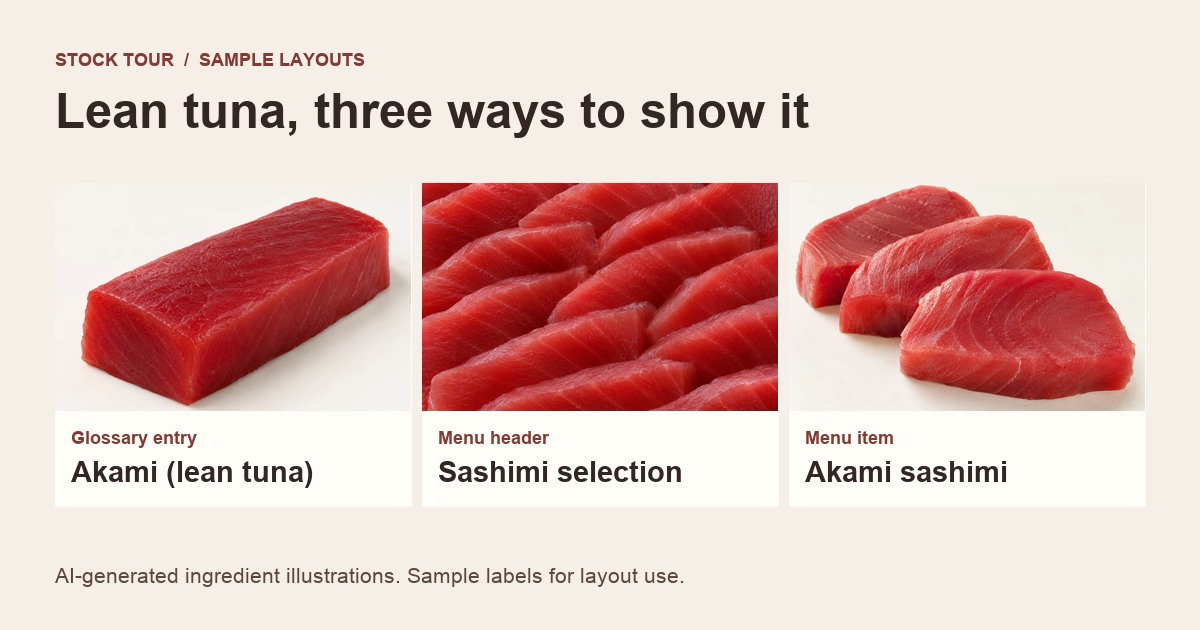
Choose the tuna image by what the reader needs to recognize. Use the whole block beside an Akami (lean tuna) glossary entry, overlapping slices above a Sashimi selection heading, or separate slices beside an Akami sashimi menu item. The three free WebP illustrations below are 1536 × 1024 pixels.
Use a whole block to explain what akami means
For a seafood glossary, put the block beside Akami (lean tuna) and add a short definition such as “The lean red part of tuna.” The whole block has a clear outline against the pale surface, so keep the whitespace around it when you crop. The block shows the ingredient before portioning and suits an explainer or supplier guide.
Use overlapping slices for a sashimi section header
Place Sashimi selection directly below the image or in its own solid band. The repeating slices will still look intentional in a short banner, but the bright lines on the fish can compete with text placed directly on the image. If the banner needs a tighter crop, choose which part of the image stays in the frame and check the headline on a narrow screen.
Use separate slices beside a sashimi menu item
Try Akami sashimi as the item name and Lean tuna slices as the explanation. Place the picture beside the wording, leaving the gaps between the pieces visible. An actual menu can add the portion count as text once confirmed. If you are labeling nigiri, choose an image that shows the fish over rice. These illustrations show a block or slices on their own.
The label examples use “akami” for lean tuna and let the dish name specify what is served. Real menus use the term in both forms, including a combined nigiri and sashimi listing. See the Akami Sushi Bar menu and the Sen-zushi nigiri menu for examples. Use a species name only if you can verify it for the actual dish.
Get the WebP for your layout
Open the illustration you want and choose Continue to Free Download. Review the Stock Tour Asset License and choose Download WebP. All three examples are AI-generated ingredient illustrations. Use your own dish photo if customers need to see the actual portion, plate, or garnishes they will receive.